Your Drawing. Your Source of Truth.
Draw the network once. Get validated configs, AVD YAML, and the full client design package — all from the same canvas, always in sync.
Supported Vendors
Why Rackloom
The diagram says one thing. The spreadsheet says another. The network runs a third.
Here, the diagram, the spreadsheet, and every config come from one drawing — so they can't disagree.
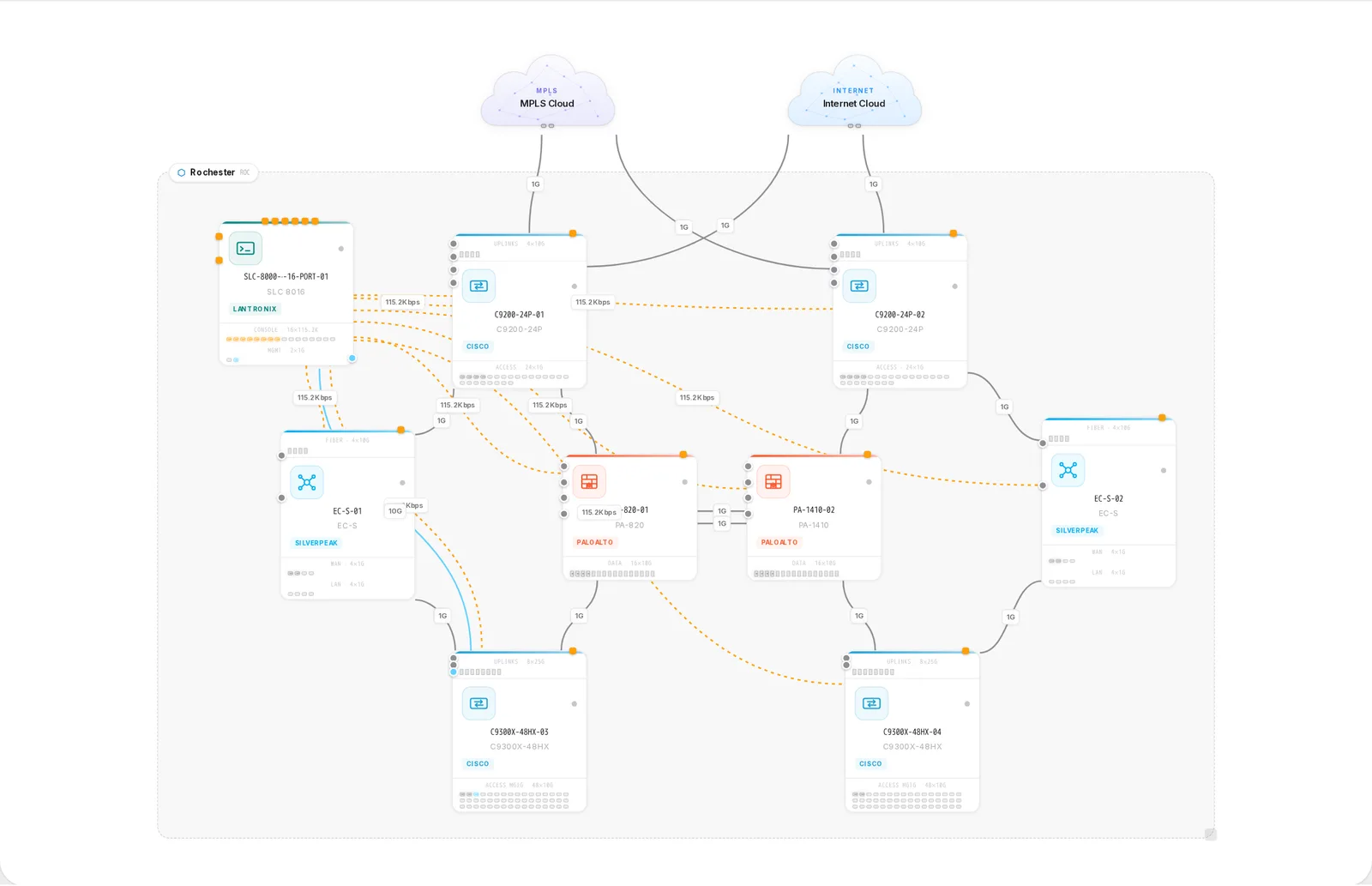
Visual Topology Canvas
Infinite drag-and-drop canvas with smart alignment, grid snapping, and multi-layer views.
Config Generation
One click to production-ready Cisco IOS-XE, Arista EOS, and Silver Peak configs via Jinja2.
Pre-Publish Validation
Catch IP conflicts, VLAN mismatches, BGP peer gaps and STP errors before you deploy.
AI Network Architect
Claude-powered design review that catches SPOFs, validates CVD/AVD alignment, and suggests fixes.
VXLAN EVPN Fabrics
Design Arista AVD leaf-spine fabrics with dual output: EOS CLI configs or AVD Ansible YAML.
Full Export Suite
Client-ready PDF design packages, Visio diagrams, Excel BOM, cable schedules, and AVD Ansible packages.
Cloud on Canvas
Reverse-engineer a live Azure subscription onto the canvas — or design VNets, NSGs and gateways from scratch — then ship it all back as Terraform.
Start From a Blueprint
Never face a blank canvas. The Blueprint wizard builds your whole multi-site network — DCs, campuses, branches — one tab per site, wired through a WAN overview.
Design
A canvas that thinks in topologies
Drag devices onto an infinite canvas with smart alignment, grid snapping, and multi-layer views — then scale up to full Arista AVD leaf-spine VXLAN EVPN fabrics without leaving the designer.
Start Designing →Validate
Catch it before the maintenance window
Pre-publish validation flags IP conflicts, VLAN mismatches, BGP peer gaps and STP errors before you deploy — while the AI Network Architect reviews the design for SPOFs and CVD/AVD alignment, and suggests fixes.
See how validation works →Ship
Documentation that syncs itself with every change
Every design exports as a complete package: PDF design documents, Visio diagrams, Excel BOM, cable schedules, device CLI configs, and AVD Ansible YAML — always in sync with the topology on the canvas.
See every export →Frequently asked questions
Rackloom is a web-based network design platform where the drawing is the source of truth: you draw your network topology on a visual canvas, and it generates validated, production-ready device configurations, documentation, and design packages that stay in sync with the canvas. It combines design, configuration generation, validation, documentation, and deployment in one tool for multi-vendor enterprise networks.
Rackloom supports Cisco (IOS-XE and NX-OS), Arista (EOS and AVD EVPN-VXLAN fabrics), Aruba (ArubaOS-CX), Palo Alto (PAN-OS), and HPE Aruba EdgeConnect SD-WAN (Silver Peak). It also models Microsoft Azure resources with Terraform export, and supports Lantronix terminal servers for out-of-band console management.
You place devices on the canvas, connect their ports, and set properties like VLANs, routing, and management settings in the device configuration tabs. Rackloom then renders per-vendor CLI output from templates and runs validation layers that catch issues such as IP conflicts, VLAN mismatches, and BGP peer gaps before you publish or deploy.
No. Open the canvas and design a network in your browser — no sign-up, no email, no payment details. Guests can validate the design, generate full device configurations (10 per hour), and download the cable schedule, bill of materials and design document. An account is what lets you save a project, share it with your team, keep version history, and deploy to live devices.
Yes — and you can use the designer and configuration generation before you even create one. A free account adds saved projects, sharing, version history, comments and drift detection, with no payment details required.
Diagram tools produce static drawings that you then translate into device configuration by hand. Rackloom treats the drawing as the source of truth: the same canvas design generates validated, production-ready configurations, cabling schedules, IP allocations, and documentation that stay in sync with the design.
Your designs live in isolated projects tied to your account, with role-based access control — roles such as owner, admin, editor, viewer, and observer decide who can see or change a design. Accounts use verified email sign-up and enforced password compliance, and you can request deletion of your data at any time via [email protected].
Ready to draw your network?
Open the designer and drag your first device onto the canvas.